
Cahpter 2: Object-Oriented Programming (OOP)
What You've Done So Far
In The First Chapter (Previous one), you learned the foundations of Java.
You wrote simple programs, created classes, added a main method, and used variables,...
But you probably noticed something: You keep repeating the same pattern.
You write code like this:
public class Hello {
    public static void main(String[] args) {
        System.out.println("Hello!");
    }
}
Every time you start a program, you create a class, add keywords you don't fully understand, and follow rules that feel strict.
So the big questions appear:
- Why do we always create classes?
- What do these keywords really mean?
- Why does Java force this structure?
- What problem is Java trying to solve?
This is exactly what This Chapter will answer.
In this chapter, you will understand the real structure behind Java and why everything revolves around objects.
Before we go deeper, let's explore the core ideas of OOP and the problem it was created to solve.
The Real Problem OOP Solves
You've learned to write code. But imagine building something big:
A game with 1000 enemies, each with position, health, inventory, and behavior.
Without OOP:
double enemy1X = 100;
double enemy1Y = 200;
int enemy1Health = 50;
String[] enemy1Inventory = {"sword", "shield"};

double enemy2X = 150;
double enemy2Y = 250;
int enemy2Health = 50;
String[] enemy2Inventory = {"sword", "shield"};

// ... repeat 1000 times?
This is impossible to maintain. You can't manage 4000 variables.
With OOP:
class Enemy {
    double x, y;
    int health;
    String[] inventory;

    void move() { ... }
    void attack(Player player) { ... }
    void takeDamage(int amount) { ... }
}

// Create 1000 enemies
for (int i = 0; i < 1000; i++) {
    enemies.add(new Enemy());
}
Now you manage 1000 objects, not 4000 variables.
The real problem OOP solves: Managing complexity by grouping related data and methods together.
When Do You Need OOP?
When you're building a project, ask yourself:
Sign 1: Objects That Change Over Time
// Game example: Player moves, takes damage, picks up items
Player player = new Player();
player.move(10, 20);      // Position changes
player.takeDamage(5);     // Health changes
player.pickUp(new Sword()); // Inventory changes
This is stateful - the object persists and changes. OOP shines here.
Counter-example (REST API):
// Web request: fetch data, return response, done
GET /users/123 → database → return JSON → FORGET

// No objects that persist. Functional approach is better.
Sign 2: Objects Interact With Each Other
// Combat: Player attacks Enemy, Enemy takes damage
player.attack(enemy);     // Player object calls method
enemy.takeDamage(10);     // Enemy object reacts
Objects coordinate. OOP is perfect.
Counter-example (Data pipeline):
# Transform data from A to B to C
data = read_file()
data = filter_bad_rows(data)
data = transform_values(data)
write_file(data)

# No interactions between objects. Functional is better.
Sign 3: Multiple Types With Shared Behavior
// Different enemies, but all have common behavior
class Enemy { void takeDamage(int amount) { ... } }
class Goblin extends Enemy { ... }
class Dragon extends Enemy { ... }

// Both Goblin and Dragon reuse takeDamage
Inheritance and polymorphism help here.
Counter-example (Simple CRUD):
// Just moving data between API and database
POST /users → create in DB
GET /users/:id → fetch from DB
PUT /users/:id → update in DB

// No inheritance needed. Functional is simpler.
Sign 4: Complex Business Logic
// Banking: Transfer money between accounts
// Must check fraud, lock accounts, update audit logs, notify users
// Complex coordination between multiple services
account1.transfer(account2, 500);  // OOP helps organize this
Counter-example (Simple operation):
// Just get data and return it
GET /product/:id → fetch → return
Where OOP Is Best Used
Use OOP For:
- Games: Objects represent players, enemies, items. They interact, take damage, move.
- Desktop/Mobile Apps: Objects persist while the app runs. UI components are objects. State is complex.
- Complex Enterprise Systems: Business logic is complicated (Banking, healthcare,...).
- UI Frameworks: Components are naturally objects. Parent-child relationships. Event handling.
Don't Use OOP For:
- Simple Web APIs: Just fetch data, return JSON. Functional is cleaner and faster.
- Data Pipelines: Transform data from A to B to C. Functional chaining is natural.
- Scripts and Automation: Simple sequential operations. OOP adds unnecessary complexity.
- Microservices: Small, focused services. Keep them simple with functions.
Is OOP Important Nowadays?
Yes, but not everywhere.
OOP is still heavily used in:
- Enterprise Java (banking, insurance, government systems)
- Game development (Unity, Unreal)
- Desktop applications (IntelliJ, VS Code)
- System software (databases, compilers)
OOP is declining in:
- Web backends (Node, Python, Go use functional style)
- Frontend (React uses functional components, not classes)
- Data science (Pandas, Spark use functional transformations)
- DevOps (Infrastructure as code is declarative)
The trend: Use OOP when it solves a real problem. Don't force it everywhere.
Java forces OOP because it was designed in the 2000s when OOP was "the answer." Modern languages let you choose.
What You'll Learn in This Chapter
1. Classes & Objects: The Basics
What is a class? How do you create objects? How do they store data and perform actions?
Key Concepts:
- Classes are blueprints
- Objects are instances created from blueprints
- Properties (data) and methods (behavior)
- The
newkeyword creates objects
Why It Matters: Every Java program is made of classes and objects. You can't write Java without understanding this.
2. Encapsulation: Protecting Your Data
How do you prevent someone from breaking your object by changing its data directly?
Key Concepts:
privateandpublickeywords- Getters and setters (accessor methods)
- Why you shouldn't expose raw data
Why It Matters: Protects objects from being used incorrectly. A bank account shouldn't let users set balance directly to -1000.
3. Inheritance: Reusing Code
How do you avoid writing the same code multiple times for similar classes?
Key Concepts:
extendskeyword- Parent and child classes
- Reusing parent methods in child classes
Why It Matters: Write once, reuse many times. Don't repeat code.
4. Polymorphism: Flexible Code
How do you write code that works with different types?
Key Concepts:
- Method overriding
- Treating child objects as parent type
- Different implementations, same interface
Why It Matters: Write generic code. One method handles many types.
5. Abstraction: Hiding Complexity
How do you hide internal complexity and show only what's needed?
Key Concepts:
- Abstract classes
- Interfaces (contracts)
- Implementation details vs public interface
Why It Matters: Users don't need to understand everything. Show only what's necessary.
6. Composition: Objects Containing Objects
How do you build complex objects from simpler objects?
Key Concepts:
- Objects inside objects
- Has-a relationships (composition)
- Building systems from smaller pieces
Why It Matters: Real complexity is built from simple, reusable pieces.
7. Static vs Instance: Class-Level vs Object-Level
What's the difference between static (class-level) and instance (object-level)?
Key Concepts:
statickeyword- Shared vs separate data
- When to use each
Why It Matters: Some data belongs to the class, some to each object. Understanding the difference prevents bugs.
What You'll Gain After Mastering OOP
After this chapter, you'll be able to:
- Design classes that represent real-world things: "What should this class be? What data does it hold? What can it do?"
- Create systems from objects: Build a game with hundreds of coordinating objects. Build a business system with accounts, users, transactions.
- Prevent bugs with encapsulation: Protect data. Make sure objects can't be used wrong.
- Reuse code with inheritance: Write once, reuse across similar classes.
- Write flexible code with polymorphism: One method works with many types.
- Read any Java codebase: Because all Java code is objects.
- Think like a software architect: Not just "does this code work?" but "is this well-designed?"
OOP Knowledge Transfers to Other Languages
Here's something important: Once you master OOP in Java, you already understand OOP in any other language.
OOP concepts are universal:
- Classes exist in C++, C#, Python, JavaScript
- Inheritance works the same everywhere
- Polymorphism is the same principle
- Encapsulation is the same idea
Learning OOP in Java means:
- Learning C#? Already know OOP (syntax is almost identical)
- Learning Python? Already know OOP (just fewer rules)
- Learning C++? Already know OOP (just more complexity)
- Learning JavaScript? Already know OOP (even though JavaScript doesn't force it)
The patterns are universal. Only syntax changes.
The Mindset Shift
Before (Procedural):
I have data.
I have functions that operate on data.
I call functions on data.
After (Object-Oriented):
I have objects.
Objects know their own data.
Objects perform their own actions.
I ask objects to do things.
It's a different way of thinking. But once you get it, you see the world differently.
Real Example: Before vs After
Before OOP (Procedural)
// Scattered code
int playerX = 100;
int playerY = 200;
int playerHealth = 100;

int enemy1X = 500;
int enemy1Y = 300;
int enemy1Health = 50;

void movePlayer(int dx, int dy) {
    playerX += dx;
    playerY += dy;
}

void playerAttack(int enemyIndex) {
    if (enemyIndex == 1) {
        enemy1Health -= 20;
    }
}

void enemyAttack() {
    playerHealth -= 10;
}
Problems:
- Confusing and messy
- Hard to scale to 1000 enemies
- No structure
After OOP
class Player {
    int x, y, health;

    void move(int dx, int dy) { x += dx; y += dy; }
    void takeDamage(int amount) { health -= amount; }
}

class Enemy {
    int x, y, health;

    void takeDamage(int amount) { health -= amount; }
    void attack(Player p) { p.takeDamage(10); }
}

// Usage
Player player = new Player();
List<Enemy> enemies = new ArrayList();
for (int i = 0; i < 100; i++) enemies.add(new Enemy());

for (Enemy e : enemies) {
    e.attack(player);  // Clear and simple
}
Benefits:
- Clear and organized
- Scales to any number of enemies
- Easy to add new features
The Challenge Ahead
OOP isn't hard, but it's different. You'll learn:
- Syntax - How to write classes, methods, inheritance
- Design - When to create a class, what it should contain, how it should behave
- Thinking - Modeling problems as collections of interacting objects
Design is the hardest part. But once you get it, you're a real programmer.
The Journey
Chapter 1 (Previous one) -> gave you the foundations of Java: how Java runs, how a program is built, and the basic tools like variables, operators, and control flow.
With these skills, you are ready for the real magic.
Chapter 2 (This one) -> teaches you Object-Oriented Programming. This is the heart of Java. You will learn how to think in objects, design clean code, reuse logic, and build real structures. Once you master OOP, Java finally starts to make sense.
Chapter 3 (Next one) -> shows you how to build real features with Core Java. You will use Strings, Collections, Generics, and other powerful tools that turn ideas into working programs.
By the end of this chapter, you won't just write code that works.
You will write code that feels organized, clean, and ready for bigger projects.
Should I Use OOP?
1. Does your program work with things (objects) that stay in memory
   and change over time?
     → YES: OOP is a good choice.
     → NO: Go to next question.

2. Do these things (objects) need to talk to each other or work together?
     → YES: OOP fits well.
     → NO: Go to next question.

3. Do you have different types that share some common behavior?
     → YES: OOP helps (inheritance / interfaces).
     → NO: Go to next question.

4. Is your code mostly simple functions that take data and return new data,
   without storing state?
     → YES: Use functional or procedural style.
     → NO: Use OOP.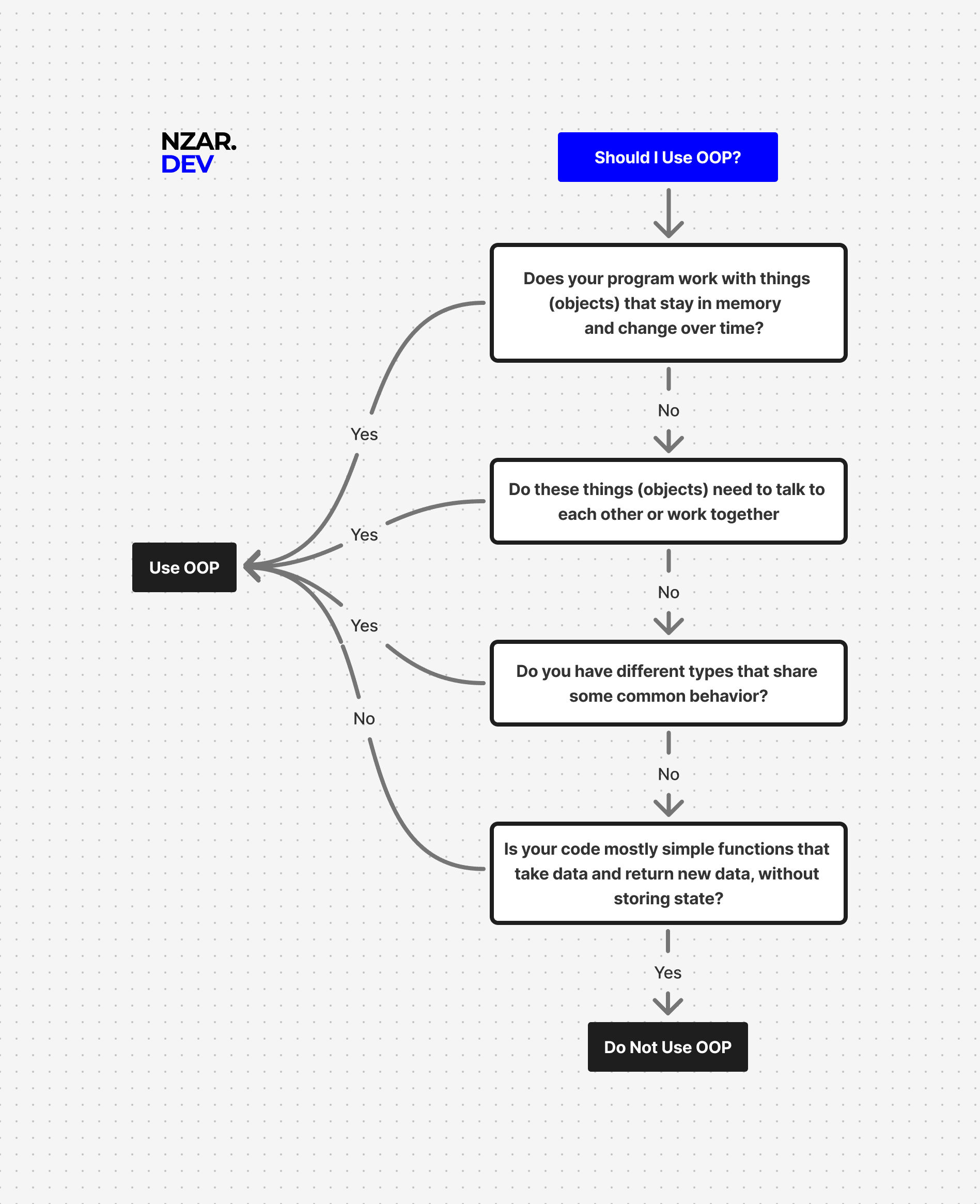
Ready?
OOP is the foundation of enterprise programming. Master it in Java, and you can build anything.
Let's start with the simplest concept: What is a class? What is an object?