
How Java Runs: JDK, JVM, JRE, Bytecode
Your First Java Program
You've installed Java and opened your code editor. You write your first program:
public class HelloWorld {
    public static void main(String[] args) {
        System.out.println("Hello, World!");
    }
}
You save it as HelloWorld.java. Now you want to see it run. You open the terminal and type:
javac HelloWorld.javaSomething happens. You see a new file appear: HelloWorld.class. You don't remember creating it. What just happened?
Then you type:
java HelloWorldAnd your program runs. Output: "Hello, World!"
But here's the problem: You wrote one file (HelloWorld.java), but somehow a different file (HelloWorld.class) appeared and made things work.
To fully appreciate this, we need to understand Java's layers. Let us explore what actually happened.
What Just Happened
When you ran those two commands, Java do two very different operations:
Step 1: javac HelloWorld.java -> Compilation (transforms your Java code into bytecode)
Step 2: java HelloWorld -> Execution (running the bytecode)
Most programming languages do this in one invisible step. Java makes it a bit clear. Two separate steps. Two different tools. Two different purposes.
Let's understand what each one does.
Step 1: The Compiler (javac) - Inside the JDK
When you typed javac HelloWorld.java, you use the Java compiler. I think it's clear that (javac => Java + c => Java + compiler). The compiler is a tool that comes from the JDK (Java Development Kit).
What is the JDK?
JDK is a toolbox. It's everything you need to write and compile Java code. When you install Java on your computer, you're installing the JDK (if you're developing).
What's inside this toolbox?
- javac -> The compiler (the tool you just used)
- java -> The interpreter/launcher (we'll use this next)
- javadoc -> Creates documentation
- jar -> Packages your code
- jdb -> Debugger for finding bugs
- Other utilities -> Various development tools
For now, focus on these two:
- javac -> The compiler. Translates Java code to bytecode
- java -> The launcher. Runs your bytecode
Other tools (javadoc, jar, jdb, etc.) are useful later, but you don't need them to write and run Java programs. Master the basics first.
What did javac actually do?
When you ran javac HelloWorld.java, the compiler:
- Read your
HelloWorld.javafile - Checked if your code is syntactically correct (no errors)
- Translated your human-readable Java code into bytecode
- Wrote the bytecode to a new file:
HelloWorld.class
That's why the .class file appeared. The compiler created it.
What is bytecode?
Bytecode is an intermediate language. It's not like Java (humans can not easily read it), and it's not machine code (your CPU doesn't understand it too :D). It's something in between, specifically designed for the Java Virtual Machine (JVM) to understand.
Think of it like this:
Your Java code: System.out.println("Hello, World!");
     ↓ (javac translates)
Bytecode: GETSTATIC java/lang/System out
          LLOAD 0
          INVOKESPECIAL...
It looks weird, but the JVM knows exactly what to do with it.
Step 2: The Java Virtual Machine (JVM) - Inside the JRE
When you typed java HelloWorld, you started the Java Virtual Machine. The JVM comes from the JRE (Java Runtime Environment).
What is the JRE?
JRE is the runtime. It's everything you need to run Java programs. If you just want to use someone else's Java application, you only need the JRE. You don't need the JDK.
What's inside the JRE?
- JVM - The Java Virtual Machine (the engine)
- Class libraries - Pre-written code you can use
- Other runtime support - Behind-the-scenes utilities
What did the JVM actually do?
When you ran java HelloWorld, the JVM:
- Looked for the
HelloWorld.classfile (bytecode) - Read the bytecode inside it
- Translated the bytecode to machine code specific to your operating system (Windows/Mac/Linux)
- Executed the machine code on your computer
- Printed: "Hello, World!"
This is the magic moment. The same HelloWorld.class file can run on Windows, Mac, or Linux. The JVM on each platform does the translation.
So, is Bytecode Identical Across All Operating Systems?
Yes. Completely identical. When javac compiles your Java code, it produces the exact same bytecode whether you're on Windows, Mac, or Linux. You could compile on your Linux, send the .class file to a Windows user, and they'd get identical bytes.
Then, the JVM reads those bytecode instructions and converts them into native machine code specific to the operating system it is running on. (So, based on the bytecode you provide, it generates a unique set of machine instructions specific for that particular operating system).
How do I deploy Java apps across different OS?
It depends on the type of app, but one of the most common methods is bundling your app with a JVM for each OS.
How it works:
- Compile your Java app →
MyApp.jar - Create a separate build for each OS, each containing its own JVM:
MyApp-Windows.exe(Windows JVM + your app)MyApp-Mac.dmg(macOS JVM + your app)MyApp-Linux.tar.gz(Linux JVM + your app)
- Users download the installer for their OS.
- They install it (JVM included automatically).
- They run your app like any normal native program.
Best For: Consumer desktop applications where a smooth installation experience matters.
Why Two Steps? Why Not Just One?
This is where Java's genius reveals itself.
In C++:
Write C++ code → Compile to Windows native machine code (.exe)
Write C++ code → Compile to Mac native machine code (.app)
Write C++ code → Compile to Linux native machine code (ELF executable)

If you want your program on 3 platforms:
you recompile the same source code 3 times to create 3 platform-specific executables.
In Java:
Write Java code → Compile once to bytecode
                ↓
        Bytecode is platform-independent
                ↓
        [JVM on Windows] → Runs
        [JVM on Mac] → Runs
        [JVM on Linux] → Runs

You compile once. The bytecode runs everywhere.
The bytecode acts as a universal middle language. It's the same whether you're on Windows, Mac, or Linux. The JVM translates it to whatever machine code is needed for that specific platform.
The Three Layers Explained
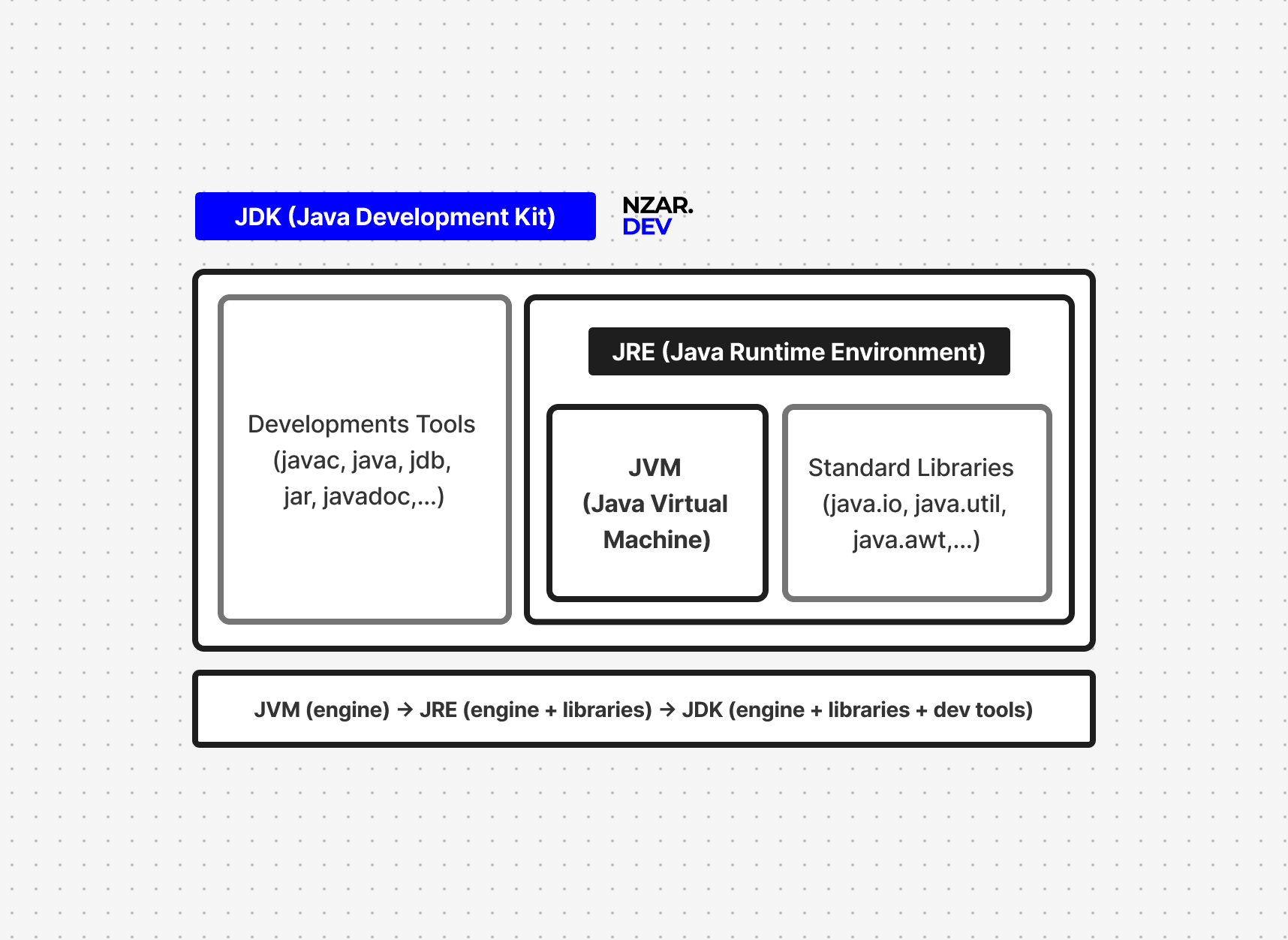
Layer 1: JDK (Java Development Kit) - For Developers
What: The toolbox for writing and compiling Java code.
When you use it: During development, when you're writing code and need to compile it.
Key tool: javac (the compiler)
Example:
javac MyProgram.java    # Uses JDK to compile
# Creates MyProgram.class (bytecode)
Important: If you're developing Java, install JDK. That's it. JDK includes everything you need because it includes the JRE inside it.
Layer 2: JRE (Java Runtime Environment) - For Running Programs
What: The runtime for executing Java programs.
When you use it: When you want to run a Java program (yours or someone else's).
Key tool: java (the launcher/interpreter)
Example:
java MyProgram    # Uses JRE to run bytecode
# Executes the program
Important: If you just want to use Java applications, you only need the JRE. You don't need the compilation tools.
Relationship:
JDK = Compiler + Debugger + Tools + JRE
JRE = JVM + Class Libraries + Runtime Support
So JDK includes JRE. If you have JDK, you have everything.
Layer 3: JVM (Java Virtual Machine) - The Engine
What: The software that actually runs your bytecode.
When you use it: Indirectly, whenever you run a Java program with java.
What it does:
- Reads bytecode (.class files)
- Translates bytecode to machine code for your platform
- Executes the machine code
The revolutionary part: The JVM is different for each platform (Windows JVM, Mac JVM, Linux JVM), but they all understand the same bytecode. This is why Java code is truly portable.
Same bytecode everywhere ✓
Different JVM for each platform ✓
Result: Write Once, Run Anywhere ✓
Is the JVM slow?
Modern JVMs are very fast. They start by interpreting bytecode, which is slower, but quickly detect which parts of the program run often.
Those “hot” parts are then compiled into optimized machine code while the program runs, making them as fast as C++ or even faster in some cases.
Unlike C++, which is compiled once, Java can keep re-optimizing based on real usage. This is why many high-performance companies use Java. The only downside is a slightly slower start-up time, but for long-running applications, JVM performance is excellent.
Understanding Bytecode
Let's go back to that mysterious .class file. It contains bytecode. You don't write bytecode, the compiler creates it. But understanding what it is helps you understand Java.
What is bytecode exactly?
Bytecode is an instruction set designed for the JVM. Each instruction does something simple:
- Load a variable
- Call a method
- Compare two values
- Jump to a different part of the code
Example: Your Java line:
System.out.println("Hello, World!");Becomes bytecode instructions like:
GETSTATIC java/lang/System.out
LDC "Hello, World!"
INVOKEVIRTUAL java/io/PrintStream.println
The JVM reads these instructions and translates them to real machine code.
Note: bytecode wasn't invented by Java, but Java made it practical and mainstream. Other languages had similar ideas (Smalltalk, LISP), but Java's implementation was clean, efficient, and timed perfectly with the internet boom.
Bytecode vs Assembly
People ask: "Is bytecode like assembly?"
Yes and no. Similar concept, but different purposes:
| Assembly | Bytecode |
|---|---|
| Written for a specific CPU (Intel, ARM) | Written for the JVM (platform-independent) |
| Very low-level instructions | Higher-level instructions |
| Runs directly on hardware | Runs on the JVM, which translates to machine code |
Can bytecode be reverse-engineered? How do hackers exploit this?
Yes. Bytecode is readable (though difficult), and hackers can exploit this. Bascly they're Decompiling bytecode means converting .class files back to readable Java source code. Tools can automatically do this. this can cause:
- Stealing business logic: Decompile your app, steal your algorithm
- Looking for bugs: Read your code, find exploits
- Removing license checks: Decompile, remove DRM, redistribute
- IP stealing: Copy your code and claim it as theirs
How to protect your Java code:
- Obfuscation - Scramble variable/method names to make decompiled code unreadable
Before: calculatePrice(quantity, discount) After: a(b, c) - Encryption - Keep sensitive algorithms on a server, not in client code
- Code signing - Digitally sign your code so tampering is detected
- Native compilation - Use GraalVM to compile Java to native code (harder to reverse-engineer)
- Don't hardcode secrets - Never put passwords, API keys, or encryption keys in your code
What developers should do:
- Assume your bytecode can be decompiled
- Never hardcode secrets (passwords, API keys, tokens)
- Keep sensitive logic on secure servers
- Use obfuscation for desktop/mobile apps
- For sensitive apps, use native compilation
The reality: If security is critical, don't rely on code obscurity. Use encryption, server-side validation, and cryptography.
The Complete Journey Visualized
Here's your code's complete journey:
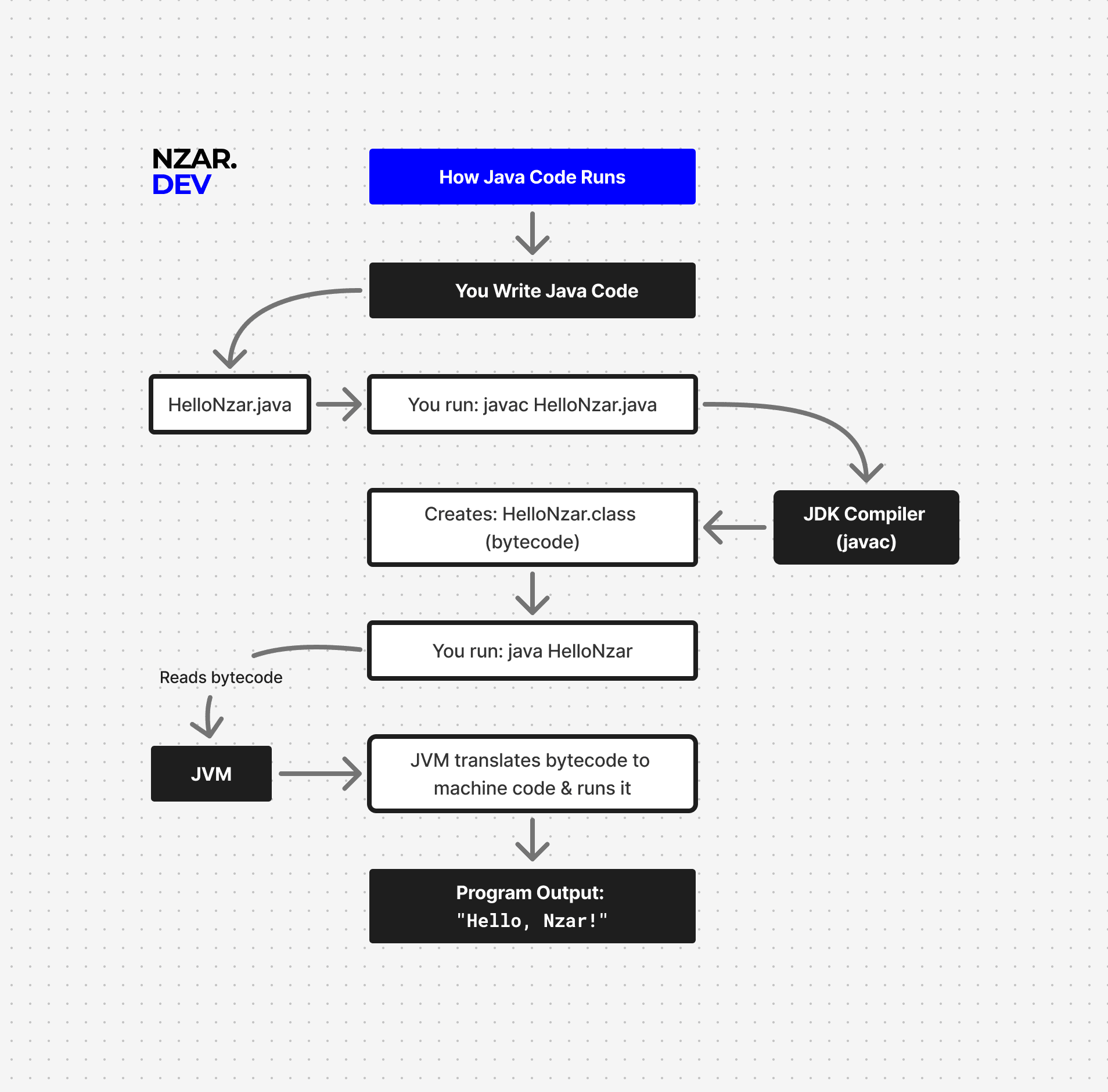
You write: HelloWorld.java

        ↓ (You run: javac HelloWorld.java)

   [JDK Compiler]
   (javac tool)

        ↓ (Creates)

HelloWorld.class (bytecode)

        ↓ (You run: java HelloWorld)

   [JVM - Java Virtual Machine]
   (Reads bytecode)
   (Translates to machine code)
   (Executes)

        ↓ (Output)

"Hello, World!"
This entire process takes milliseconds. But understanding each step is what makes you a real Java developer.
Why This Matters
-
For debugging: If your code compiles but crashes, it's a runtime issue (JVM/JRE problem). If it won't compile, it's a compilation issue (JDK/syntax problem). Understanding the difference speeds up debugging.
Here's a real examples: NullPointerException
javaString name = null;
System.out.println(name.length()); // Compiles fine!
Your code is syntactically correct (proper Java grammar).
javaccompiles it successfully. But when the JVM runs it,nameisnulland has nolength()method. Runtime crash. This is YOUR bug, not the JVM's, but it only appears at runtime. -
For deployment: You only need to send
.classfiles (or packaged.jarfiles), not source code. Users just need the JRE to run your program. -
For performance: The JVM's bytecode allows runtime optimization. This is why Java can be very efficient despite the extra abstraction layer.
-
For portability: Your bytecode runs the same on Windows, Mac, and Linux. This is Java's superpower.
In Summary
Java's magic is this two-step process combined with intelligent runtime optimization:
- Write once - You write
.javasource code once - Compile once - You compile to bytecode once (platform-independent)
- Bytecode is universal - Same bytecode on Windows, Mac, Linux
- JVM is platform-specific - Each OS has its own JVM
- Runtime optimization - JVM optimizes as your program runs
- Result - Truly cross-platform code that runs efficiently
The bytecode is the universal language. The JVM is the smart translator that optimizes for each platform. Your code runs anywhere with performance that rivals C++.
Understanding JDK, JRE, and JVM isn't just theory. It's the foundation for everything else: frameworks, deployment, debugging, performance tuning. You now know what's actually happening when you write and run Java code.
That's real understanding.
Next up: The Art of Java Structure.