

CSS Basics: Syntax, the Cascade & Specificity
You write color: red, save, refresh, and nothing changes. You check the spelling, check the selector, refresh again. Still nothing.
Most of the CSS bugs you will meet come down to two things: not fully understanding the syntax, or not fully understanding the cascade. This article fixes both.
What CSS Actually Is
CSS stands for Cascading Style Sheets. It is a declarative language: you describe how things should look, and the browser figures out how to do it. Remember from the HTML part that HTML gives a page its structure. CSS is what turns that structure into something people want to look at.
A CSS file is a list of rules. Each rule says "these elements should look like this." Here is one:
p {
  color: blue;
  font-size: 16px;
}
It has three parts, and the names are worth learning:
pis the selector. It tells the browser which elements the rule applies to, here every<p>on the page.colorandfont-sizeare properties. These are the things you can change.blueand16pxare values. These are what you set the property to.
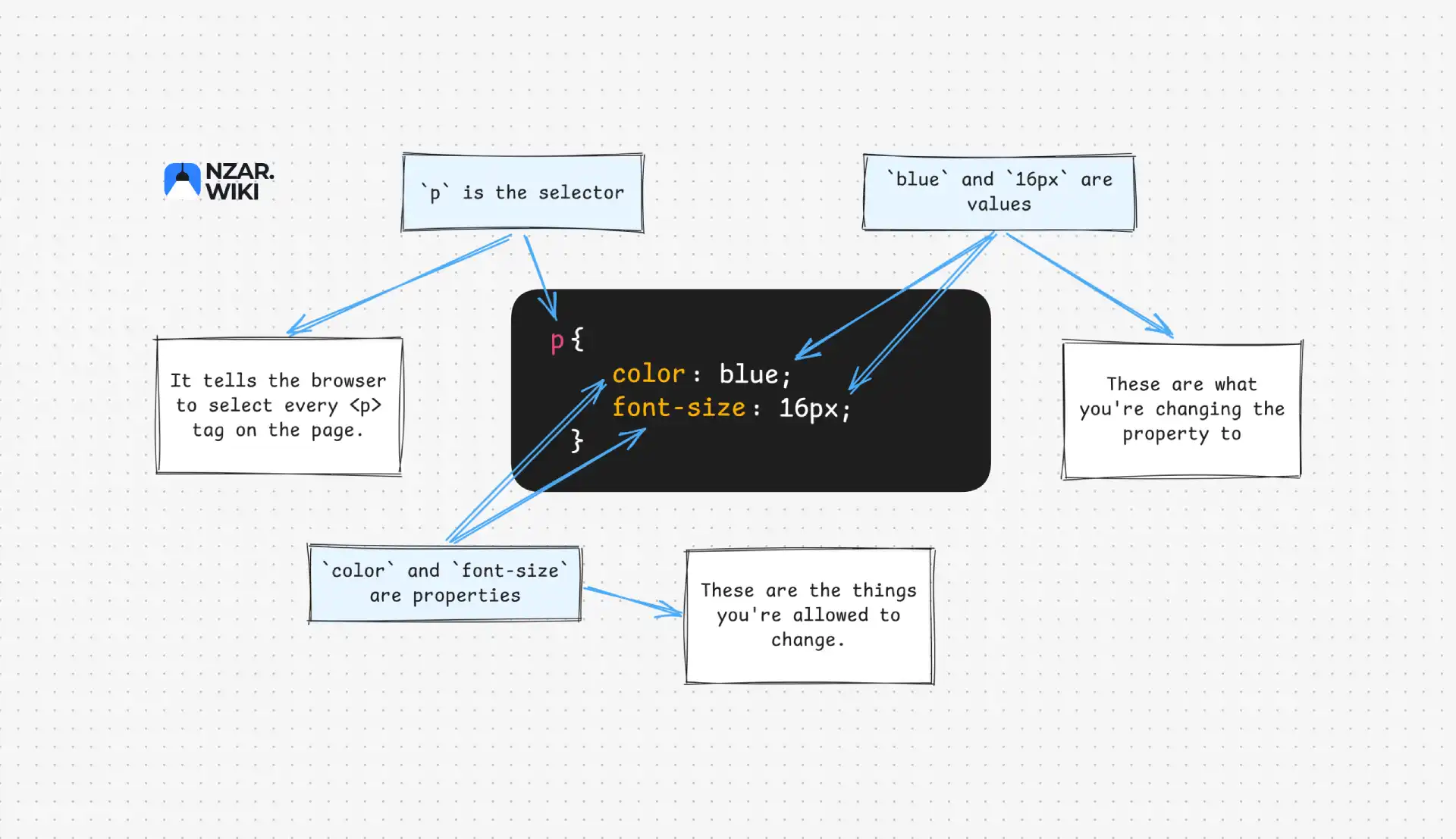
A property and its value together, like color: blue;, is a declaration. A selector plus its declarations inside curly braces is a rule (or rule set). Many rules in a .css file make a stylesheet.
Two small details save a lot of pain. Every declaration ends with a semicolon, and you should always write it, even on the last line. Comments use /* like this */ and can span several lines.
CSS Forgives Mistakes
What happens if you mistype something? Unlike JavaScript, nothing crashes and nothing is reported. The browser silently ignores the invalid declaration and keeps the rest.
.card {
  colour: red; /* unknown property, ignored */
  padding: 16pixels; /* invalid value, ignored */
  margin: 8px; /* still applied */
}
This is deliberate, so old browsers can survive new CSS and the other way around. The downside is that CSS never tells you when you got it wrong. If a style does not apply, you have to investigate. We will get to how in a moment.
Three Ways to Write CSS
CSS does not have to live in its own file. There are three ways to apply it.
Inline CSS goes directly on an element with the style attribute:
<p style="color: blue; font-size: 16px;">Hello there</p>It works, but it does not scale. You repeat yourself on every element, and structure gets mixed with style. Use it sparingly, for quick tests or values set by JavaScript.
Internal CSS lives in a <style> tag inside the <head>:
<head>
  <style>
    p {
      color: blue;
      font-size: 16px;
    }
  </style>
</head>
Better, since your styles are grouped, but they are stuck to one page. Ten pages would mean ten copies.
External CSS is what you will use in real projects. You write a separate .css file and link it:
<head>
  <link rel="stylesheet" href="styles.css" />
</head>p {
color: blue;
font-size: 16px;
}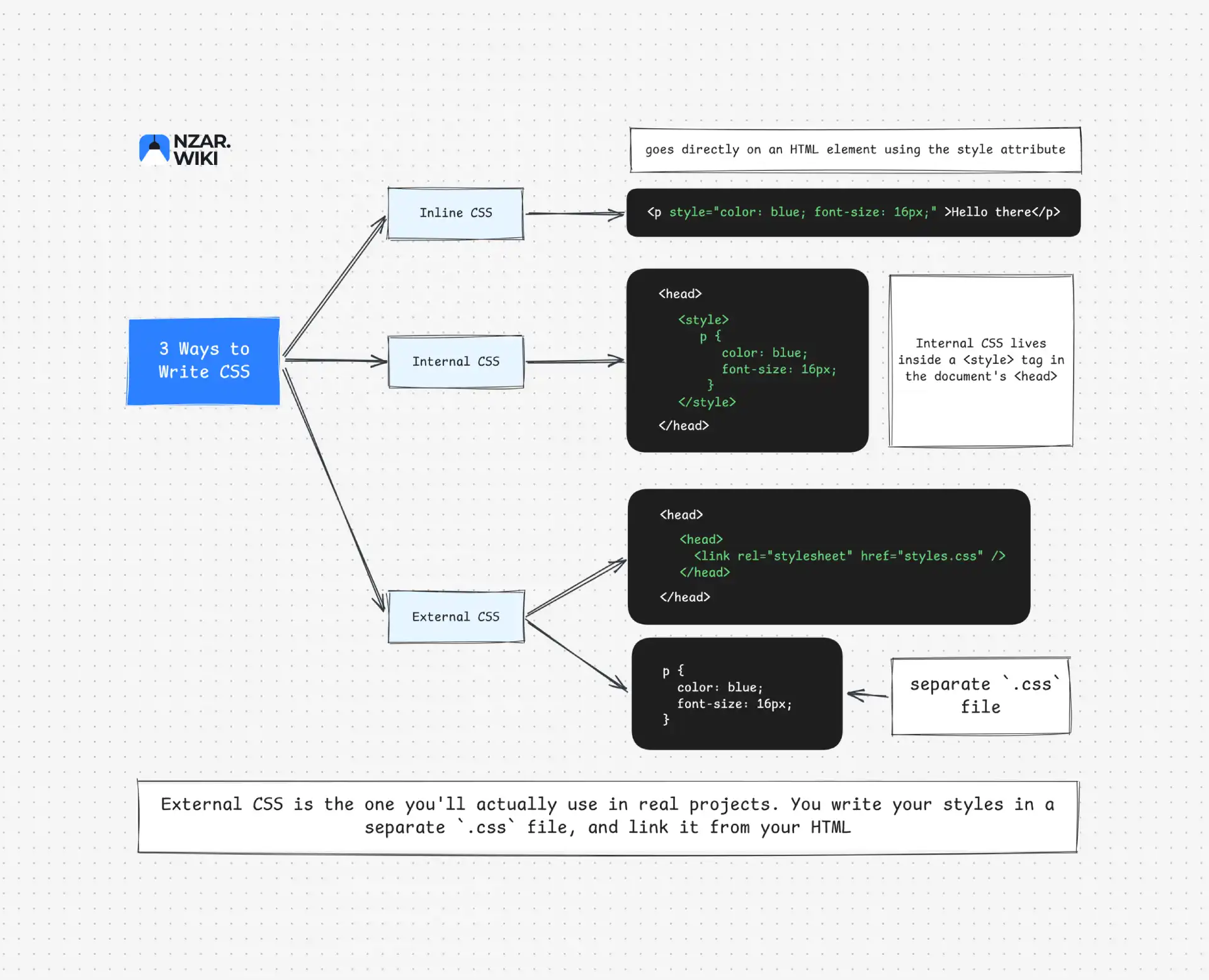
One file, linked from every page. Change it once and every page updates. The browser can also cache it, so it is downloaded only once. The rest of this part of the chapter assumes external CSS.
Selectors: Choosing What Gets Styled
Before the cascade makes sense, you need to be able to pick targets. These are the four you will use constantly:
/* Element selector: every <h1> */
h1 {
  margin: 0;
}

/* Class selector: anything with class="card" */
.card {
  padding: 16px;
}

/* ID selector: the one element with id="header" */
#header {
  background: white;
}

/* Descendant selector: <a> tags inside .card */
.card a {
  color: teal;
}
To apply the same rule to several selectors, separate them with commas: h1, h2 { ... }.
There is much more to selectors, like attribute selectors, pseudo-classes, combinators and modern additions such as :has(). Those get their own article, Selectors Explained. Element, class and ID selectors are all you need for now.
The Cascade: Why It's Called "Cascading"
Here is the situation that eventually trips up everyone. One rule says the text is red. Another rule says it is blue. Which one wins?
The browser does not guess. It follows a strict order, and that order is the cascade. Think of a waterfall of rules flowing down, where each can override the others, but only according to fixed priorities.
Remember from the browser article that the page has a built-in look before you write a single line of CSS? That is the browser's own user-agent stylesheet, which gives links their blue underline and headings their size. Your CSS does not replace it. It competes with it, together with any library styles you add.
One thing to understand early: the cascade picks a winner per property, per element, not per rule. Two rules can each win a different property on the same element.
p {
  color: blue;
  font-size: 20px;
}
.note {
  color: red;
}
For <p class="note">, the color comes from .note and the font size comes from p. Each property had its own contest.
To decide a contest, the browser checks these in order and stops at the first one that produces a winner:
- Origin and importance: where the declaration came from, and whether it is marked
!important. - Specificity: how precisely the selector targets the element.
- Source order: if everything is tied, the last declaration wins.
Origin has three possible values: the browser's stylesheet, the user's own settings, and your author stylesheet. For normal declarations, yours beats the user's, which beats the browser's. That is why your CSS can override the default blue links.
The real algorithm has a few more steps, such as cascade layers, which sit between origin and specificity. We will cover layers later in this part of the chapter. If you want the complete picture, the CSS Cascading and Inheritance specification is the source of truth.
Now let's slow down on the two that cause most confusion.
Specificity: The Real Source of Most Confusion
When two rules target the same element, with the same importance, the browser compares how specific their selectors are. The more precisely a selector aims, the more weight it carries, no matter which rule was written first.
Think of directions. "The house with the blue door on Elm Street" is more specific than "a house."
Here is how weight is counted, from heaviest to lightest:
- Inline styles beat any selector in your stylesheet.
- IDs (
#header). - Classes (
.card), attribute selectors ([type="text"]) and pseudo-classes (:hover). - Elements (
p,div) and pseudo-elements (::before).
A useful way to picture it is columns of points: IDs, classes, elements. Compare left to right, and the first column with a higher number wins.
p {
  color: black;
}
/* specificity: 0-0-1 (one element) */

.intro {
  color: blue;
}
/* specificity: 0-1-0 (one class), beats the rule above */

#main-text {
  color: green;
}
/* specificity: 1-0-0 (one ID), beats both */
If <p id="main-text" class="intro"> matches all three, it ends up green. The ID wins.
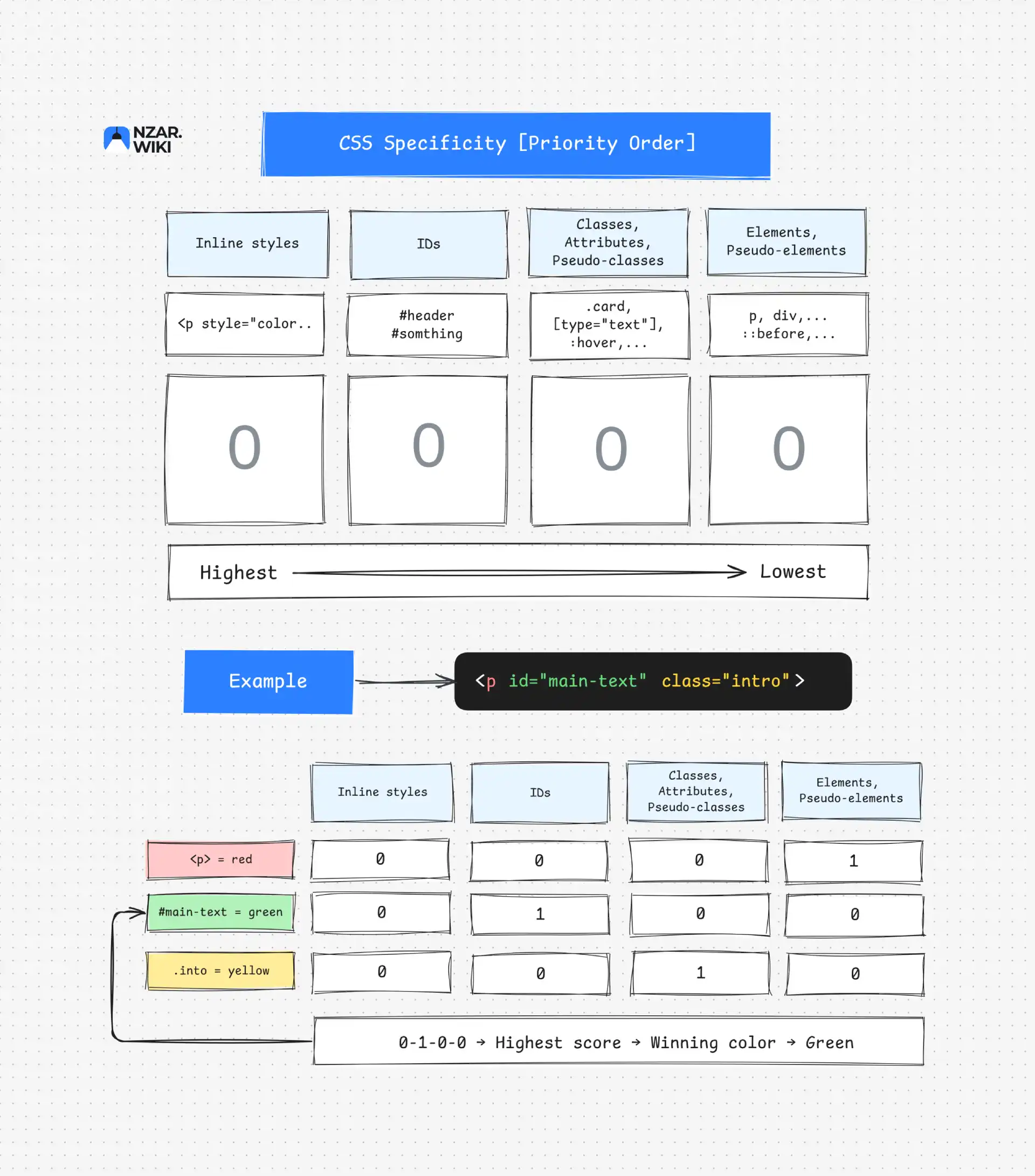
The columns do not add up into one number. One ID beats any number of classes, because you never carry over from one column to the next.
.card .title {
  color: purple;
}
/* 0-2-0, two classes */

body p {
  color: orange;
}
/* 0-0-2, two elements */
Both selectors have two parts, but the class-based one wins. Classes are weighted higher than elements, so the count of parts alone tells you nothing.
Selectors that add nothing at all are the universal selector * and combinators like the space or >. The :where() pseudo-class also always counts as zero, which makes it handy for low-priority defaults.
A Realistic Bug
Imagine a sidebar, and someone wrote this a year ago:
#sidebar a {
  color: gray;
}
Today you add a button inside it:
.button {
  color: white;
  background: blue;
}<div id="sidebar">
<a class="button" href="/signup">Sign up</a>
</div>The button has a blue background but gray text. Why? .button scores 0-1-0, while #sidebar a scores 1-0-1. The ID column wins, so the gray text wins. The background had no competitor, so it applied normally.
The fix is rarely a bigger selector. Keep specificity low and flat, so rules stay easy to override.
Source Order: The Tiebreaker
If two rules have the same specificity, the cascade falls back to source order. Whichever comes later wins, even across files. That is why the order you link your stylesheets matters.
p {
  color: black;
}

p {
  color: red;
}
Same specificity, so the second rule wins and the text is red.
Notice this is the last thing the browser checks. "The last rule wins" is only true when specificity is equal. Also, being closer to the element in your HTML gives a rule no extra power. Only the selector counts.
The Option You Should Rarely Use
Adding !important moves a declaration into a stronger group, checked before specificity:
p {
  color: black !important;
}
This beats a normal declaration from any selector. It can only be beaten by another !important, and that is the problem. Once one exists, the next developer needs another one to override it, and your stylesheet becomes an arms race.
There is one more twist. For important declarations, the origin order reverses, so the browser's and the user's important styles outrank yours. That is how users with accessibility needs can force styles a website cannot override.
Treat !important as a last resort. If you reach for it often, your CSS needs better organization, and cascade layers, coming later in this part of the chapter, are the proper fix.
Inheritance: Some Styles Pass Down Automatically
What if no rule sets a property at all? The browser still needs a value, and it gets one through inheritance. Some properties automatically pass from parent to child.
body {
  color: blue;
  font-family: sans-serif;
}
You do not need to style every heading and paragraph. Elements inside <body> inherit the color and font. A child can still override it:
body {
  color: blue;
}

p {
  color: red;
}
Now paragraphs are red, while everything else stays blue.
Not Every Property Inherits
Text-related properties usually inherit, because that is usually what you want:
color,font-family,line-height
Layout properties generally do not:
margin,padding,border,width,height
You would not want every nested element to copy its parent's border and spacing. Properties that do not inherit fall back to their initial value, the default defined by the CSS specification. Each property's page on MDN tells you whether it inherits.
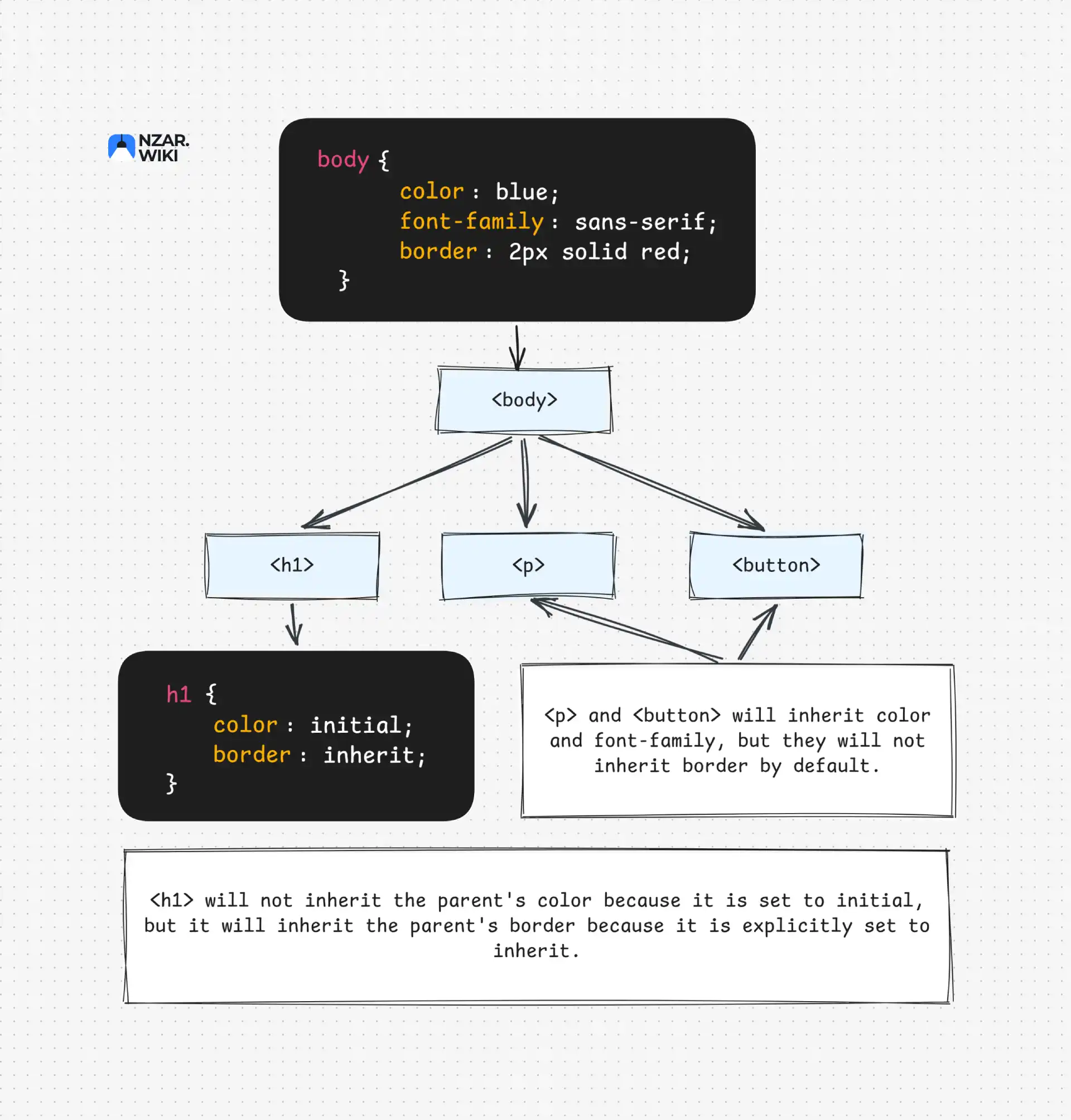
There is one trap worth knowing. An inherited value has no specificity, so any rule that targets the element directly beats it, even the browser's own default stylesheet. That is why this does not turn your links green:
body {
  color: green;
}
Paragraphs become green, but links stay blue, because the browser's stylesheet targets a directly.
Controlling Inheritance
A few keywords work on any property:
.child {
  color: inherit; /* copy the parent's value */
  border: initial; /* reset to the property's initial value */
}
unset picks the right behavior for you. It acts like inherit if the property normally inherits, and like initial if it does not:
.child {
  color: unset; /* inherits, because color normally does */
  margin: unset; /* resets, because margin does not inherit */
}
Finding Out Who Won
You do not have to work this out in your head. Since CSS never reports errors, the browser's DevTools are your best friend.
Select an element and open the Styles panel. Rules are listed by priority, and declarations that lost the contest appear with a strikethrough. The Computed tab shows the final value of each property. If you have not used these tools yet, the Inspecting HTML with Browser DevTools article shows you how.
When a style does not apply, ask three questions. Is my declaration there at all, or was it dropped as invalid? Is it struck through, and which rule beat it? Or is the element inheriting something I did not expect?
Why This Matters
Once this clicks, CSS debugging changes completely. Instead of adding more rules and hoping one sticks, you can look at a stubborn style and ask the right questions. Is something more specific overriding this? Is there an !important somewhere? Is a later rule beating it?
It also changes how you write CSS. You stop reaching for IDs and !important to force styles through, and you keep selectors flat so overrides stay simple. On a team, that is the difference between a stylesheet that stays predictable at 500 lines and one nobody dares to touch at 5,000.
If you want to keep practicing, MDN's Handling conflicts lesson has exercises for exactly this.
But here is the thing. Specificity decides which rules win, and now you know how. Have you ever added padding to a box and watched your whole layout suddenly break? Or set a width of 300px and ended up with something wider? That is not the cascade. That is the box model, and it is the next thing you will learn. Once you understand it, you will never fight spacing again.