

How Everything Works: From Hardware to App
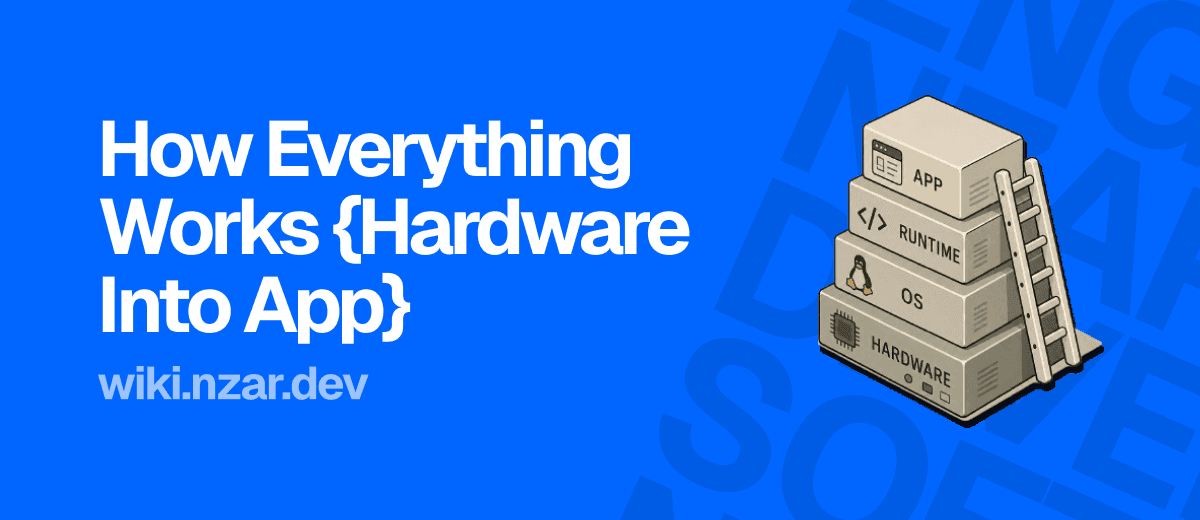
You write one line of code, something like console.log("hello"), hit run, and a word appears on your screen almost instantly. That single line never talks to the hardware directly. It passes through a whole stack of layers first, each one doing a specific job, each one hiding the layer below it from you.
This is the last article in this part, and it's really a victory lap. Every article before this one, the CPU and RAM, the operating system, file systems, networking, browsers, servers, binary, was actually one layer of this exact stack. Let's put them all in order and see the whole ladder at once.
Why Layers Exist At All
Why not just write code that talks straight to the hardware? Wouldn't that be faster, with nothing sitting in between?
It would be faster, and also nearly impossible to build anything real with. Imagine having to write, for absolutely every single program, the exact electrical instructions to move data in and out of RAM, the exact commands to read a specific spot on a disk, the exact logic to share the CPU fairly with every other program running at the same time. Every developer, for every app, reinventing all of that from scratch, for every different chip and disk they might run on.
That's the world before layers. The world after layers is what we actually live in: each layer solves one hard problem once, then hides that complexity behind a much simpler interface for the layer above it to use. You get to write console.log("hello") and trust that everything underneath it just works, because someone already solved that problem, once, at a lower layer.
Layer One: Hardware
At the very bottom sits the hardware itself, the CPU, RAM, storage and I/O devices from the very first article in this wiki. The CPU that executes instructions one at a time, at billions of instructions per second. The RAM that acts like a desk, holding whatever the CPU is actively working with. Storage acting like a filing cabinet, holding things permanently even when the power goes off.
This layer doesn't know or care what a website is, what JavaScript is, or what you're trying to build. It only knows how to do one thing, extremely fast: move and manipulate the 0s and 1s we covered in the last article. Everything else in this ladder exists to make that raw capability usable for actual human problems.
Layer Two: The Operating System
Directly on top of hardware sits the operating system, Windows, macOS, Linux, whatever you're running right now. We covered this properly in the OS article: it manages processes and threads, decides which program gets the CPU and for how long, and manages memory so one program can't accidentally read or corrupt another program's data.
This is the first real layer of abstraction. Instead of every single program needing its own logic for "how do I ask for a slice of CPU time" or "how do I safely read a file off disk," the OS handles all of that once, centrally, and exposes a much simpler set of rules that every program can rely on. This is also exactly where the file system article fits in, the OS is what turns raw sectors on a disk into the folders and files you actually interact with.
Layer Three: The Runtime
Here's the layer we've mentioned in passing but haven't fully named yet: the runtime. This is the environment your actual code executes inside of, things like the JavaScript engine inside your browser, or Node.js on a server, or the Python interpreter running a .py file.
Why does this layer need to exist separately from the OS at all? Because the OS speaks in very low-level terms, memory addresses, raw system calls, machine instructions, and almost no human writes code at that level day to day. The runtime sits between your code and the OS, translating the code you actually write, JavaScript, Python, whatever it is, into the lower-level instructions the OS and hardware can actually act on. This is also the layer responsible for things like garbage collection, quietly cleaning up memory your code isn't using anymore, so you don't have to manage that by hand.
Before the runtime layer existed, imagine having to write raw machine instructions to loop over an array, or to make a network request. After the runtime layer, you write for (const item of list) or fetch(url), and the runtime handles the translation all the way down. That gap, between what you type and what the machine actually needs to do, is the runtime's entire reason for existing.
Layer Four: The Application
At the very top sits the application, the actual code you write. This is the layer where you spend nearly all of your time as a developer: the JavaScript on a webpage, the React components rendering a UI, the Express routes handling a server's requests. All of it sits comfortably at the very top of this ladder, deliberately shielded from having to think about the three layers underneath it.
This is exactly why the browser and server articles earlier in this part felt like they were describing entire worlds of their own. A browser is an application. A backend server is an application. Both of them are simply very large, very sophisticated programs, sitting at this same top layer, relying on a runtime, which relies on an operating system, which relies on hardware, exactly like everything else.
Watching Something Climb the Whole Ladder
Let's trace one concrete action through all four layers at once: your code reads a file from disk.
Your application layer writes something simple, like readFile('data.txt'). That call gets handed to the runtime, which translates it into the specific lower-level instruction the operating system actually understands for reading files. The operating system then checks permissions, figures out exactly where that file physically lives, and issues the real command to the storage hardware. The hardware retrieves the raw bytes and hands them back up, through the OS, through the runtime, finally arriving back at your application as usable data.
Four layers, four completely different jobs, all triggered by one line of code, and all of it happening in a handful of milliseconds. You only ever wrote one line. Everything else happened because each layer trusted the one below it to do its job correctly.
Why This Matters
Once you can see this whole ladder at once, a lot of confusing developer advice starts making sense. "This bug is a memory leak" points at the runtime layer, not your logic. "This won't run on that OS" is a layer-two problem. "The disk is out of space" is a layer-one problem no amount of clever code can fix. Knowing which layer a symptom is actually coming from is most of what separates a fast diagnosis from hours of guessing in the wrong place.
It also explains why learning to code gets easier once you understand the layers below your own, even though you'll rarely touch them directly. You don't need to write an operating system to be a great engineer. But knowing that processes, memory, and hardware exist underneath your code, quietly doing their job, is exactly what turns confusing errors into logical ones. That's the whole point of this first part of the wiki, and it's the foundation everything else we cover from here on is going to keep standing on.