

Metadata & SEO: head, title, og tags, robots
Paste a link into WhatsApp, Slack, or Twitter, and a second later a neat little card appears, a title, a short description, sometimes even an image, all pulled from a page you haven't even opened yet. That card isn't generated by magic. It's built entirely from a handful of tags sitting quietly in your page's <head>.
Remember from the first article in this part: the <head> holds information about the page, nothing visibly rendered on it. Metadata is exactly that information, and this article is about the handful of tags that matter most, both for how your page gets shared, and how it gets found in the first place.
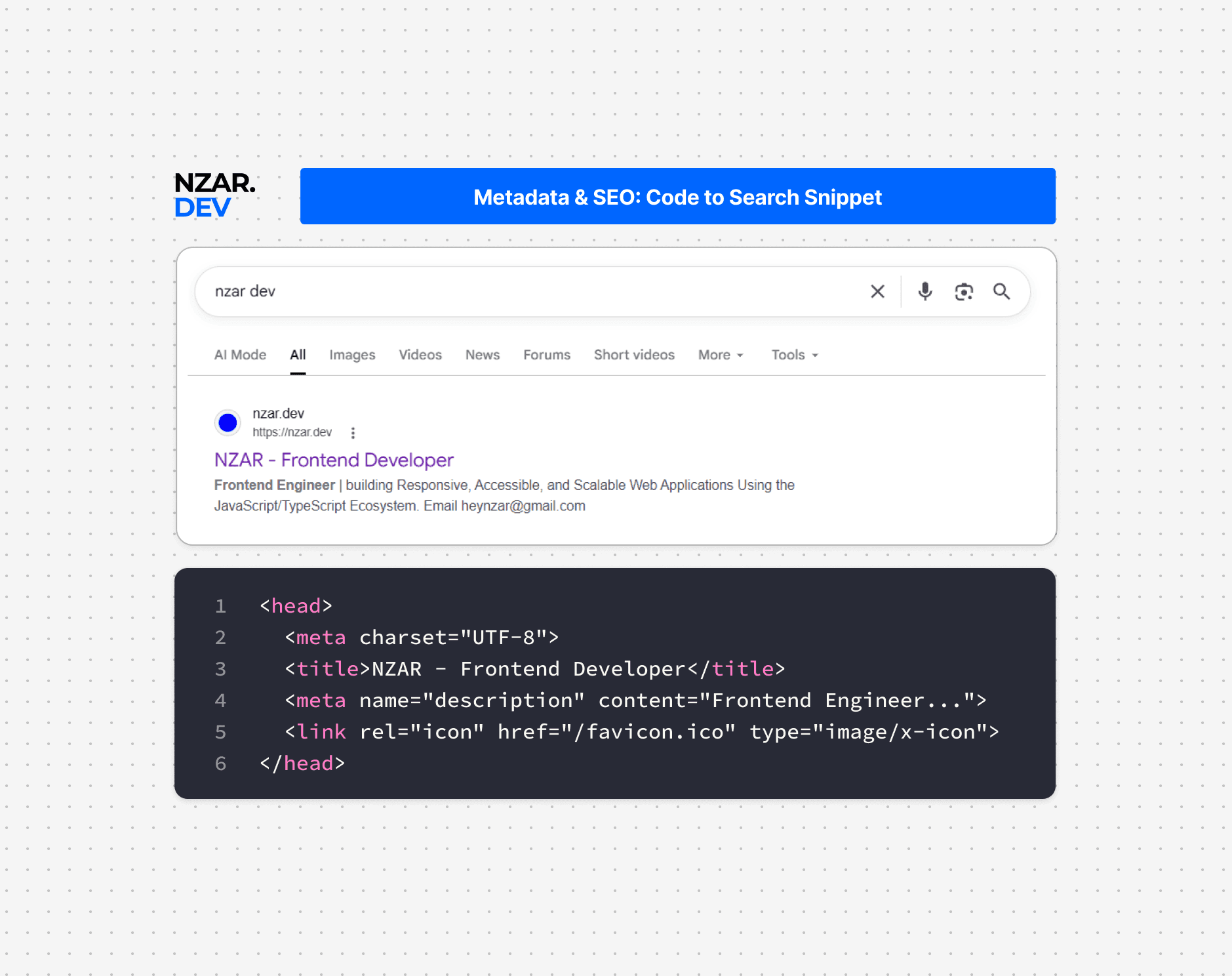
The Title Tag: More Important Than It Looks
The single most important piece of metadata on any page is also one of the simplest:
<title>Best Chocolate Chip Cookie Recipe | My Baking Blog</title>This exact text shows up in three places that matter a lot: the browser tab, a bookmark if someone saves your page, and the big blue clickable headline in search results. It's often the very first thing a person decides whether to click on, before they've read a single word of your actual page.
A vague title like Home or Untitled Document wastes that entire opportunity. A specific, descriptive title, ideally naming both the page's content and your site, gives both search engines and real humans an immediate, accurate reason to click.
The Meta Description
Just below the title in most search results sits a short snippet of text, and that comes from the meta description:
<meta
  name="description"
  content="A simple, foolproof chocolate chip cookie recipe with crispy edges and a soft center. Ready in 30 minutes."
/>
This tag never appears directly on your rendered page, only in search results and some share previews. Search engines don't always use it word for word, sometimes they'll pull a different snippet if they think it answers the searcher's question better, but writing a clear, accurate one gives you real influence over how your page gets described to someone deciding whether to click.
Open Graph Tags: Making Shared Links Look Good
Here's where that WhatsApp preview card actually comes from. Open Graph is a shared standard, originally created by Facebook, that a huge number of platforms now read from when generating link previews.
<meta property="og:title" content="Best Chocolate Chip Cookie Recipe" />
<meta
  property="og:description"
  content="Crispy edges, soft center, ready in 30 minutes."
/>
<meta property="og:image" content="https://example.com/cookie-photo.jpg" />
<meta property="og:url" content="https://example.com/cookie-recipe" />
Before adding these tags, a shared link often falls back to guessing, sometimes pulling a random image from the page, sometimes showing no image at all, and often using the plain title tag with no proper description. After adding them, you control exactly what shows up: a specific, appealing image, a title and description written specifically for that context, not just reused from the page itself. This is the entire difference between a shared link that looks like a professional card and one that looks broken or blank.
Twitter Cards: A Similar, Separate Standard
Twitter historically used its own, slightly different tags, called Twitter Cards, though it now falls back to Open Graph tags in many cases if these are missing.
<meta name="twitter:card" content="summary_large_image" />
<meta name="twitter:image" content="https://example.com/cookie-photo.jpg" />
Adding these alongside your Open Graph tags is a small amount of extra effort that ensures your preview looks intentional on Twitter specifically, rather than relying entirely on a fallback.
Robots: Telling Search Engines What to Do
Not every page on a site is meant to show up in search results, a login page, an internal admin panel, a duplicate printable version of an article. Two related tools control this.
A robots.txt file, sitting at the root of your site, gives broad, site-wide instructions to search engine crawlers about which parts of the site they're allowed to visit at all. A meta robots tag, placed in a specific page's <head>, gives instructions for that one page specifically:
<meta name="robots" content="noindex, nofollow" />noindex tells search engines not to include this specific page in their results. nofollow tells them not to follow any links found on this page when deciding what else to crawl. These are page-level instructions, more precise than the broader, site-wide rules in robots.txt, and both exist for the same reason: not everything on your site is meant to be found through a search engine.
Canonical URLs: Avoiding Duplicate Content
Sometimes the exact same content is reachable at more than one URL, a product page reachable both with and without a tracking parameter, for example. Search engines can get confused about which version to actually rank, and sometimes treat them as duplicate, competing pages.
<link rel="canonical" href="https://example.com/cookie-recipe" />This tag simply says "if you found this content somewhere else too, this is the one true URL to credit." It's a small tag that quietly prevents a real, common SEO headache.
Favicons: The Small Icon in the Tab
One last small but universally recognized piece of metadata: the little icon sitting in a browser tab next to your page's title.
<link rel="icon" href="/favicon.ico" />Small, easy to forget, and immediately noticeable the moment it's missing, showing a generic blank page icon instead.
Putting It All Together
Here's what a well-built <head> looks like once all of this comes together:
<head>
  <meta charset="UTF-8" />
  <meta name="viewport" content="width=device-width, initial-scale=1.0" />
  <title>Best Chocolate Chip Cookie Recipe | My Baking Blog</title>
  <meta
    name="description"
    content="A simple, foolproof chocolate chip cookie recipe with crispy edges and a soft center. Ready in 30 minutes."
  />
  <link rel="canonical" href="https://example.com/cookie-recipe" />
  <link rel="icon" href="/favicon.ico" />

  <meta property="og:title" content="Best Chocolate Chip Cookie Recipe" />
  <meta
    property="og:description"
    content="Crispy edges, soft center, ready in 30 minutes."
  />
  <meta property="og:image" content="https://example.com/cookie-photo.jpg" />
  <meta property="og:url" content="https://example.com/cookie-recipe" />

  <meta name="twitter:card" content="summary_large_image" />
  <meta name="twitter:image" content="https://example.com/cookie-photo.jpg" />
</head>
Every tag here is doing a specific, deliberate job, none of it visible on the page itself, all of it shaping how the page gets found, described, and shared everywhere else.
Why This Matters
A missing or lazy title tag is exactly why a page shows up in search results looking generic and unclickable next to competitors with a clear, specific one. Missing Open Graph tags are exactly why a link shared in a group chat shows up with no image, or the wrong one entirely. An accidental noindex left in from a staging environment is exactly why a real, finished page mysteriously never shows up in search results at all, a mistake that's more common in real production sites than you'd expect.
None of this metadata is visible on your actual rendered page, which is exactly why it's so easy to forget. But it's often the very first impression your page makes, in a search result, in a shared link, before a visitor has even loaded the page itself. Getting it right is a small amount of markup with an outsized effect on whether people ever actually click through to see the rest of your work.